
One of my portraits has been used as the coverspread of London culture magazine 'The Other Side'. In return they will be doing afeature on me for the next issue. nice.

 One of my self-portraits (Sundance) has been included in a photobook designed specifically for the iPad. Mirror Mirror features nearly 30 full screen self-portraits from 28 fantastically talented photographers who have made their work availble via creative commons. Unlike veiwing photosites (which look stunning on the iPad), this photobook can be viewed offline, as the editor states it's "something to view when I’m offline, something that I can keep in my virtual library to whip out whenever I want a high-quality photo fix." It's available to download totally free of charge from theLearningLight.com.

 My winning photo: Sanderling


 Shame on me, I am 8 months late. Back in December I posted that I wanted to play more with light this year, specifically flashes and studio lighting. It's only now in August that I've purchased my first external flash unit. The Speedlight 430 EXII already looks promising. Just sticking it on auto on my camera has produces some very nice portrait shots, I have to say it does make a lot of difference. As far as the settings on the back go though, am flumoxed, so I bought a book with pictures in it. Eventually I'd like to get a transmitter so I can fire the flash off the camera, and the Blue Peter girl inside me likes the look of these DIY light modifier kits.
 The other day I received my shiny new iPhone. The underlying reason for me getting Apple's finest was primarily because my two-year old Nokia N95 had been held together by sellotape for the past six months as the back and battery kept falling out at inappropriate moments and also because I was spending a fortune by being on the internet too much reading emails etc. The iPhone's high contract price was counterbalanced by free web access and there was no clip-on back to fall off! Plus it looked snazzy. I was happy.
 Not a photography app as such but GoogleEarth will easily help you scout locations before a shoot. More specific is FocalWare which promises to be a God-send. It calculates the Sun & Moon location, in relation to due North. This provides an exact means of researching and preparing to photograph a subject with specific lighting or placement of the sun/moon in the scene.
  Everytrail (free)is a geotracking application records your movements, takes geotagged photos, to which you can make notes and immediately upload it all to everytrail.com. Originally used as an online tool for travel storytelling, it also offers photographers the chance to take reference photographs, tagged with location data, and record and share the settings that they were taken in. These can all then be plotted on a google map.
 Can't get your head around manual exposure settings? Use a calculator! ExposureCalc will let you select from a range of different light settings and will give you the different values you need to create a good quality photograph. Photocalc on the other hand is a bit more detailed, providing depth of field (DoF) and hyper-focal distance calculations, exposure reciprocation, and flash exposure calculations. If you want a good all round tool which also tells you when the sun will rise and set then PhotoBuddy is your, er, buddy.
 tonnes of apps for this, but my favorites so far are Tiffen Cool fx, offering nearly 100 different filters which can be applied and saved as “virtual” layers and images are saved out as new files; Lomo and ToyCamera (don't think just shoot); MagicTouch - what it says on the tin, basic retouches such as blemish removal, change eye colour, clone stamp, lighten selective areas etc.

 liked it enough to move back in with my folks for a year (no offense M&D)! Sheffield is a city of many sides. It has the somberness left by deindustrialisation of the steelworks but also the beauty of the Peak District on its doorstep. A lot of effort has gone into its regeneration and restoration, but a lot has also been left to crumble away. Touted as the 'greenest city in the UK' it has also been known as simultaneously the most educated and least educated city. Personally, I love the long rows terraces made from peak district stone, the fact that no matter where you go you always have to walk up a steep hill, that there are loads of trees, its sense of community, and that the water tastes reeet nice.
 I would say that because Sheffield is many-faceted it's great to photograph. Working on the theme of 'steel' could take you in so many different directions, from the existing and dilapidated steelworks to steel architectures and art in the city centre to the old millstones returned to their rightful place in the Peak District. Only a handful of photographs done by myself so far, but these are my recommendations for photographing Sheffield:
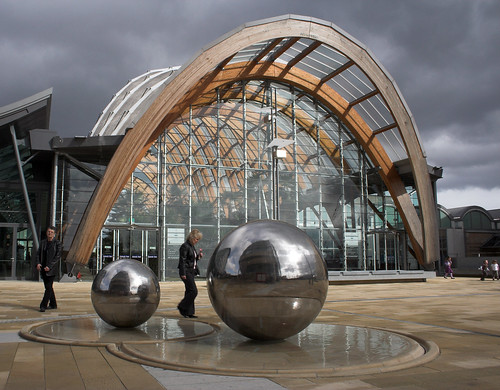 3. A meander around the city centre to see the sculptures that are starting to appear as part of Sheffield's regeneration (esp. the city train station, Millennium Galleries, and the Peace Gardens)
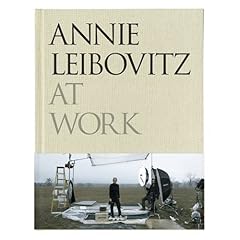 Annie Leibovitz has become one of the most iconic photographers of the century, her body of work recognisable and individual photographs iconic. This book takes you behind the scenes to hear Leibovitch talk about how she got there, her inspirations, the discourse behind each photograph and how it was actually done. Her words in many cases are quite comforting to the aspiring photographer, advising acceptance that a photograph can only be a moment in a life of a person and not capable of 'capturing' that person, that cameras are just tools of the trade and not to get hung up on brands and equipment. Some of my highlights from the book include:
 1. Find a tree (preferably one you can get up and that isn't blowing in the wind too much).


 Posts
All Comments
Posts
All Comments


