kT LindSAy. Get yours at bighugelabs.com

Tuesday, January 22, 2008

Paris photography


I was in Paris at the weekend, and a bit depressed that I was so uninspired in terms of photography. A city of lovers and culture, but pictures...not for me. I don't know, may be it was the time of year, or that I went to the wrong places, or that Paris just kept her soul well hidden, but I didn't come up with much. I think I prefer to set up photos rather than take pictures of things that already exist, or have a kind of project in my head. I like to fall in love with the idea of a potential picture, love the subject, not sure that I liked Paris enough last weekend to do a portrait of her.

Sunday, January 13, 2008

Red Shoes, White Stockings

Lately I've been really enjoying playing with photoshop and learning how to do things "properly" - like converting photos into black and white using the channel mixture and fade to colour commands and playing around with curves, saturation, sponge, burn, dodge, tools. I took this photo today and I'm quite pleased with the "retro" kind of fashion photography look however the original photo had items in it I didn't want so I "tried" to remove them. However my skills at replicating background colours and textures aren't quite there yet (you can see the texture of the wall change if you look closely). Please point me towards a decent tute if you know of one!

---UPDATE---Thank you so much to those at the digital photography school who actually downloaded my phots, weaved magic, gave me excellent instructions.... and voila!! All in the space of a few hours of me posting, fantastic!

Below you can see the original, my post-processed, and postprocessed with the help of the DPS-ers.


Thursday, January 10, 2008

Picture This (again)

A few months ago I wrote a blog about an a new flagship art series from channel 4 called Picture This, kind of like an X-Factor for photographers. Channel 4 advertised for participants, I applied, needless to say wasn't selected, and the show started airing last week. All in all I really enjoyed the show, I think the tips and advice I got from it were mostly creative rather than technical. I liked seeing the different ways the contestants approached the project brief (last week was 'portrait') and I am already routing for one of them to win (with the prize of their photography showcased in a dedicated book and exhibition of their work). However the guy who I consider took the best photo of the show (of two kids scoffing junk food in Brighton), Jay Mawson, got voted off which was a shame.

Of course there is a website that runs parallel to the show where Flickr users can upload their own photographs into their own portfolio under the categories of each project brief (here's mine!). Other users can comment on your photos and rate them for technical skill and creativity. It's sponsored by Flickr, but it doesn't work as well as Flickr. Of course the community isn't as big and the only time you get your photos featured is when you upload them (latest uploads), so needless to say you will probably not get as much exposure - the beauty of Flickr is that you can search for images and also browse through Explore. The site says that each week some of the pictures will be featured on the show which could be exciting, though I won't hold my breath! Definitely one to keep watching.

Picture This is on Sundays, Channel 4 at 7pm

Thursday, January 03, 2008

Sunday, December 23, 2007

Flickr Stats

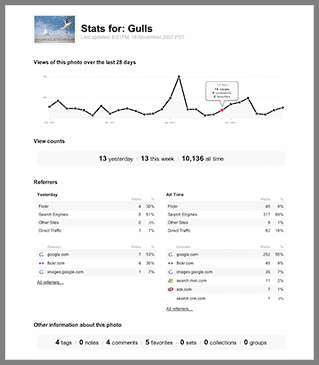
Flickr have scored gold again and last week launched one of their most requested features, Flickr Stats. If you are a pro member you can now activate the stats tool to give you all sorts of insights into how people arrive at your photos on Flickr, either through Flickr itself or through other webistes. I've been hunting for a replacement for the flickrinspector tool which disappeared earlier this year for a while now and Flickr Stats have filled this needed gap. As well as showing you how many hits you've had on your photos and your photostream on an all time, monthly, and daily basis, one of the most useful components is that the stats show you how people have arrived at a particular photo through a referer (a link on another website) - this is often because someone has used one of your photos on their website (and credited you with a link to the original upload). This makes some interesting reading...for instance through the stats I found that Sundance had recently been used in a digital photography school tutorial, creating a whopping 576 visits to my account on the 13th December, something I wouldn't have twigged otherwise. My account in general (individual photos and photostream) has had over 52,400 hits, nice! Thanks Flickr, it gives me a bit more momentum to keep uploading my photos.

Friday, December 21, 2007

Big Smile

Well, you know you are doing summit right when you find one of your photos used as an example of good prcatice in a digital photography tutorial. Check out the Digital Photography School Tutorial on using a tight frame to create a sense of infinity.

Additionally, it looks like A cupcake, cupcake? has been snatched by a gaming company (flashbang studios) who are using it as one of their user profile icons.

How do I know all this? Thanks to Flickr Stats which has just been released....but I'll write a proper blog on that later.

Wednesday, December 12, 2007

Through the viewfinder

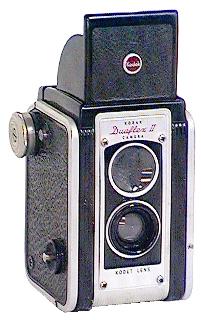
Recently my mate dan (aka smoothfoote) has inspired me to have a go at creating some fake TTV photographs. In a nutshell TTV technique is a type of digital photography that emulates film photography in 'box' cameras, creating a vintage look complete with the dust and grain and scratches. If you are a "proper" photographer you will create a contraption that will allow you to use your digital camera to take pictures "through the viewfinder" of an older camera. However I don't really have enough photography "properness" or the patience to make, let alone lug around said contraption so I thought I'd turn to good old photoshop and the wonderful free-download resources on flickr to create the technique, and why the hell not!

It took me a while to trawl the internet for a decent tutorial and ended up just mashing various tips together so I thought that I'd be useful and post what I did here.

First of all you need (suprise) a photograph you want to overlay the effect on. Then what you need is a photograph someone has taken of a white background who has the proper TTV set up. There are two great places on Flickr you can get these from: The Noise and Dust Through the Viewfinder group and Nadistock .

Armed with these two photos launch both in the almighty photoshop. Drag the TTV image onto you photo and draag the corners to fit the size of your photograph. Then click on the lower righthand layers tab in CS2 called 'Normal' change this to 'Multiply', this turns it into a transparent layer, you then have to play with it, fiddle with the opacity, colour levels, contrast ect. Also use the eraser tool (lower the opacity and make sure it has a feathery edge to reduce the border or make the center of the photograph stand out a bit more).

You may also want to fiddle with you photograph too. I used the 'pinch' tool to distort it a bit, the saturation and hues and added a bit of extra "noise".

"Save as" and hey presto, one fake ttv...here is my first effort: